Msgraph Terraform - Infrastructure-as-Code for M365/EntraID - Part 1 Authentication
Introduction
Microsoft released the long awaited MSGraph Terraform provider in 08/25 to public preview 🎉. At the time of writing the msgraph-terraform provider is available in version “0.2.0” and it supports Day 0 operations for initial deployment and provisioning. Finally you can manage each and every resource or service which is available in Microsoft Graph API.
💡 Good to know: The MSGraph Terraform provider implementation is designed as a thin layer over the MSGraph REST API, and enables direct resource management via API endpoints. Schema versioning is directly embedded in the resource body of the Terraform resource block (we’ll see examples in an upcoming post) and made available through the resource_url value, you can handle different schema versions like “v1” or “beta” independently in your resource block, without depending on provider updates.
In this series we will answer the question on why this announcement is that great news, especially for platform teams and MSPs who manage multiple tenants and are already heavily invested into terraform.
We will also dig into the provider’s capabilities and see how to use the available and different resource types. The first part of the blog series will therefore focus on basics, but mostly authentication and CI/CD integration.
Why use Terraform for Microsoft365/Entra ID management ?
💡 Note: Expand to read more about why using Terraform for Microsoft 365 and Entra ID management makes strategic sense for your organization.
Click to expand
As mentioned in the introduction, if your organization has already invested in Terraform, not just for infrastructure management, but also in building team expertise, extending that investment to manage M365 and Entra ID resources makes strategic sense. The Microsoft Graph Terraform Provider brings several benefits like:
Unified Infrastructure-as-Code approach: Manage your cloud infrastructure, identity platform, and M365 services using the same tooling, workflows, and GitOps practices your team already knows.
Version control and governance: Every change to your Entra ID configuration, group memberships, Conditional Access policies, or Intune policies is tracked in Git with complete auditing. You could use branch protection policies, require approvals from SECOPS or IAM teams before merging changes, and enforce code reviews for sensitive resources. When talking about CI/CD, the benefits are also very interesting, your existing pipeline infrastructure (GitHub Actions, Azure DevOps) and automation frameworks already running in your organization. There’s no need to build separate deployment processes or learn new tools, simply extend your current CI/CD pipelines.
Consistency across environments: Deploy identical configurations across dev, test, and production environments or spanning configurations across multiple customer environments.
Reduced context switching and clickops: No need to jump between Azure Portal, PowerShell scripts, and Terraform, your team could manage everything from one codebase.
Declarative state management: Define your desired end-state and let Terraform handle the orchestration, rather than writing imperative scripts that need to handle every edge case. There are also a few stumbling blocks when talking declarative state management we will talk about in this blog series, especially when it comes to managing graph resources with Terraform 😮 so keep your eyes open for upcoming parts. 😏
Reusability through modules: Build standardized modules for common patterns (like onboarding new teams,applications or rolling out new Intune policies) and reuse them across your organization. I’m also pretty sure that there will be verified modules similar to the great Azure Verified Modules project also coming either from Microsoft or the community itself.
Disaster recovery and redeployability: Your entire Entra ID and M365 configuration becomes reproducible code 🎉 , making recovery scenarios and migrations way easier.
Howto authenticate in different scenarios
Setting up authentication (SPNs, Managed Identities, etc.)
When it comes to authentication and you already worked with the AzureRM provider, the options are pretty much the same. Microsoft is recommending using Service Principals or Managed Identities when running Terraform inside CI/CD. In this post I will cover how to setup authentication for Azure DevOps; this will be a little bit different for GitHub.
Also keep in mind you have to setup the correct Graph API permissions for your Application Registration depending on which service you want to manage with the msgraph-terraform provider. So for example:
| Resource Type | Required Graph API Permissions | Permission Type | Scope |
|---|---|---|---|
| Users | User.ReadWrite.All | Application | Read and write all users’ full profiles |
| Groups | Group.ReadWrite.AllGroupMember.ReadWrite.All | Application | Manage groups and group memberships |
| Applications | Application.ReadWrite.All | Application | Manage app registrations and service principals |
| Conditional Access | Policy.ReadWrite.ConditionalAccessPolicy.Read.All | Application | Manage Conditional Access policies |
| Intune Policies | DeviceManagementConfiguration.ReadWrite.AllDeviceManagementManagedDevices.ReadWrite.All | Application | Manage device configurations and policies |
| Microsoft Teams | Team.ReadWrite.AllChannel.ReadWrite.AllGroup.ReadWrite.All | Application | Create and manage Teams and channels |
| SharePoint Sites | Sites.ReadWrite.AllSites.FullControl.All | Application | Manage SharePoint sites and permissions |
| Service Principals | Application.ReadWrite.AllDirectory.ReadWrite.All | Application | Manage enterprise applications |
💡 Must: Start with the minimum required permissions and expand as needed. Always follow the principle of least privilege.
⚠️ Important: After adding API permissions in the Azure Portal, don’t forget to click “Grant admin consent” for your organization. Without admin consent, the service principal won’t be able to perform operations even if the permissions are assigned.
Authentication Options
The msgraph Terraform provider supports three authentication methods. Choose based on your environment:
| Method | Best For | Security | Setup Complexity |
|---|---|---|---|
| Azure CLI | Local development | Inherits user permissions | Low |
| Service Principal | CI/CD pipelines | Dedicated identity | Medium |
| Managed Identity | Azure-hosted runners | Passwordless | Low (Azure only) |
1. Azure CLI Authentication (Local Development)
Azure CLI authentication is the quickest way to get started. Terraform uses your active az login session automatically.
Supports three modes:
- User Account: Interactive login for developers (
az login) - Service Principal: Scripted login with SPN credentials
- Managed Identity: Automatic authentication on Azure VMs
Configuration:
provider "msgraph" {
  # No explicit configuration needed - uses active az login session
}
Usage:
# Login and verify
az login
az account show

# Run Terraform
terraform init
terraform plan
💡 Best for: Local development and testing. For production CI/CD, use explicit Service Principal or Managed Identity authentication.
2. Service Principal Authentication (CI/CD Pipelines)
For automated deployments, use a dedicated Service Principal with explicit credentials. This provides better control, auditing, and security isolation.
Authentication Methods
| Method | When to Use |
|---|---|
| Client Secret | Quick setup, rotate regularly |
| Client Certificate | Higher security, little bit complex setup |
| OpenID Connect (OIDC) | Workload identity federation |
Configuration via Environment Variables
Client Secret:
export ARM_CLIENT_ID="00000000-0000-0000-0000-000000000000"
export ARM_CLIENT_SECRET="YourClientSecret"
export ARM_TENANT_ID="10000000-2000-3000-4000-500000000000"
Client Certificate:
export ARM_CLIENT_ID="00000000-0000-0000-0000-000000000000"
export ARM_CLIENT_CERTIFICATE_PATH="/path/to/certificate.pfx"
export ARM_CLIENT_CERTIFICATE_PASSWORD="CertPassword"
export ARM_TENANT_ID="10000000-2000-3000-4000-500000000000"
Provider configuration with variables:
provider "msgraph" {
  tenant_id     = var.tenant_id
  client_id     = var.client_id
  client_secret = var.client_secret  # better use environment variables
}
Secure Secret Management
Never hardcode credentials. Use one of these solutions to inject secrets at runtime:
Azure Key Vault - (Click to expand)
Enable a Managed Identity on your DevOps agent to access Key Vault without additional credentials:
# azure-pipelines.yml
variables:
- group: terraform-keyvault-secrets  # Linked to Key Vault

steps:
- task: AzureCLI@2
  displayName: 'Run Terraform'
  inputs:
    azureSubscription: 'my-service-connection'
    scriptType: 'bash'
    scriptLocation: 'inlineScript'
    inlineScript: |
      export ARM_CLIENT_ID="$(kv-client-id)"
      export ARM_CLIENT_SECRET="$(kv-client-secret)"
      export ARM_TENANT_ID="$(kv-tenant-id)"
      terraform init
      terraform apply
HashiCorp Vault - (Click to expand)
# Authenticate to Vault
export VAULT_ADDR="https://vault.company.com"
export VAULT_TOKEN=$(vault write -field=token auth/approle/login \
  role_id="${VAULT_ROLE_ID}" \
  secret_id="${VAULT_SECRET_ID}")

# Retrieve secrets
export ARM_CLIENT_ID=$(vault kv get -field=client_id secret/terraform/azure)
export ARM_CLIENT_SECRET=$(vault kv get -field=client_secret secret/terraform/azure)
export ARM_TENANT_ID=$(vault kv get -field=tenant_id secret/terraform/azure)

terraform apply
Or use the Vault provider directly:
data "vault_generic_secret" "terraform_creds" {
  path = "secret/terraform/azure"
}

provider "msgraph" {
  client_id     = data.vault_generic_secret.terraform_creds.data["client_id"]
  client_secret = data.vault_generic_secret.terraform_creds.data["client_secret"]
  tenant_id     = data.vault_generic_secret.terraform_creds.data["tenant_id"]
}
1Password CLI - (Click to expand)
# Retrieve secrets and run Terraform
export ARM_CLIENT_ID=$(op read "op://DevOps/Terraform-Azure/client_id")
export ARM_CLIENT_SECRET=$(op read "op://DevOps/Terraform-Azure/client_secret")
export ARM_TENANT_ID=$(op read "op://DevOps/Terraform-Azure/tenant_id")

terraform apply
Or use secret references in CI/CD:
steps:
- script: |
    op run -- terraform apply
  env:
    ARM_CLIENT_ID: "op://DevOps/Terraform-Azure/client_id"
    ARM_CLIENT_SECRET: "op://DevOps/Terraform-Azure/client_secret"
    ARM_TENANT_ID: "op://DevOps/Terraform-Azure/tenant_id"
3. Managed Identity Authentication (Azure-Hosted Runners or Azure Managed Devops Pools)
Passwordless authentication for Terraform running on Azure compute resources (VMs, Container Instances, DevOps Managed Pools). Activating User-Assigned Managed Identities on a Managed Azure Devops allows you to grant the Managed Identity GraphAPI Permissions as seen here in this article and from then on go secretless and request the access token via IMDS.
How does it work ?: Azure automatically provides an identity token via the Instance Metadata Service (IMDS)—a local endpoint available at http://169.254.169.254 on Azure resources. The provider makes an HTTP call to IMDS to retrieve an OAuth2 token, eliminating the need to manage any secrets.
Token request:
GET 'http://169.254.169.254/metadata/identity/oauth2/token?api-version=2018-02-01&resource=https://graph.microsoft.com/' HTTP/1.1
Metadata: true
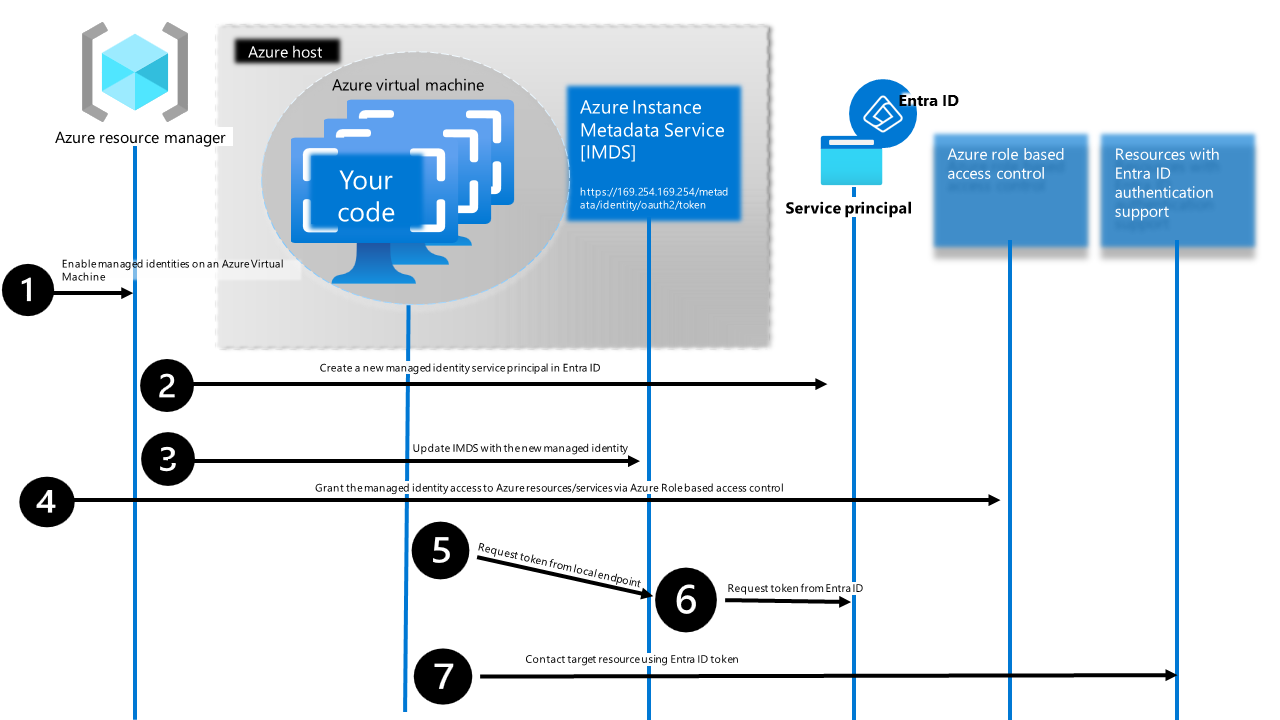
The response contains a temporary access token that Terraform uses to authenticate against Microsoft Graph API.
Prerequisites:
- Enable Managed Identity (System-Assigned or User-Assigned) on your Azure resource
- Grant the Managed Identity appropriate Graph API permissions in Entra ID (same as Service Principal)
- Ensure the compute resource can reach the IMDS endpoint (default for Azure resources)
Configuration:
provider "msgraph" {
  use_msi = true  # Uses Managed Identity
}
Azure DevOps example:
# Requires: Managed DevOps Pool with Managed Identity enabled
steps:
- script: |
    # No credential setup needed - uses Managed Identity automatically
    terraform init
    terraform apply
  displayName: 'Run Terraform with Managed Identity'
🔒 Best Practices: Managed Identity is the most secure option for Azure-hosted workloads. Tokens are short-lived and automatically rotated by Azure—no secrets to rotate, leak, or manage.
⚠️ Limitations: Only works on Azure compute resources. For non-Azure environments (GitHub Actions on GitHub-hosted runners, on-premises), use Service Principal authentication instead.
Provider resource types
Resources
Now as we have the authentication out of our way let’s hop into the provider resource types available.
| Resource Type | When to Use | Blast Radius |
|---|---|---|
msgraph_resource | This resource can manage any Microsoft Graph API resource | e.g adds defined users to a group |
msgraph_resource_action | This resource can perform any Microsoft Graph API action. Use this for operations like password resets, sending emails, or other one-time actions | changes a setting |
msgraph_resource_collection | Manage the full contents of a child reference collection (such as group members or owners) for an existing Microsoft Graph resource. Missing items are added; extra remote items are removed | takes full control of a resource e.g defines all members of a group |
msgraph_update_resource | This resource is used to add or modify properties on an existing resource. When msgraph_update_resource is deleted, no operation will be performed, and these properties will stay unchanged. If you want to restore the modified properties to some values, you must apply the restored properties before deleting. | updates an existing resource |
Now let’s look at the first resource type available “msgraph_resource”. I will show you a few examples on how to use the resource type and what options we have available there.
💡 Tip: When working with MSGraph-Terraform the Microsoft Graph API Reference is your friend 😉
Example
When to use which resource type may, at the beginning, be the most interesting question to answer. In the following example, we will try to use the new Terraform provider to handle some very basic user onboarding. The idea is to create a user object and send them a welcome email. It’s definitely not the best use case for the provider, as Terraform is designed for reproducible, idempotent configuration and lifecycle management of resources.
User onboarding, however, is typically a one-time operational task rather than a managed resource. That said, this example effectively demonstrates the provider’s capabilities and helps illustrate where the boundaries between infrastructure-as-code and operational automation should be drawn.
Anyway i think it`s a great example because we can use the first two resource types (msgraph_resource + msgraph_resource_action).
SPN API Permissions
As I do run the tests on my local machine, we will use a SPN created which has the following api permissions, remember least privilege, so we will start small:
| Type | API permission |
|---|---|
| Application | User.ReadWrite.All |
| Application | Mail.Send |
Now as we do have the right permission to create a user and send them an email, let’s authenticate via az login:
az login --service-principal \
         --username 00000000-0000-0000-0000-000000000000 \
         --password "MyCl1eNtSeCr3t" \
         --tenant 10000000-2000-3000-4000-500000000000 \
         --allow-no-subscriptions
Provider Examples
User object creation
Let’s create our Terraform config for creating the user:
terraform {
  required_providers {
    msgraph = {
      source  = "Microsoft/msgraph"
      version = "0.2.0"
    }
  }
}

provider "msgraph" {
  use_msi = false
}

resource "msgraph_resource" "user" {
  url = "users"

  body = {
    accountEnabled    = true
    displayName       = "Test User Display Name"
    mailNickname      = "testusermailnickname"
    userPrincipalName = "testuser@mycompany.com"
    usageLocation     = "DE"
    passwordProfile = {
      forceChangePasswordNextSignIn = false
      password                      = "P@ssw0rd1234"
    }
  }
  response_export_values = {
    all = "@"
    /*
       without exporting the graph api response here,
       we wont be able to use the output of the resource in our send email
       msgraph_resource_action block
    */
  }
}
License assignment
As we need to make sure the user has a mailbox as well, we need to assign them a license. Here are some common license SKUs you can use:
| License | SKU ID |
|---|---|
| Microsoft 365 E3 | 05e9a617-0261-4cee-bb44-138d3ef5d965 |
| Microsoft 365 E5 | 06ebc4ee-1bb5-47dd-8120-11324bc54e06 |
| Office 365 E3 | 6fd2c87f-b296-42f0-b197-1e91e994b900 |
| Exchange Online Plan 1 | 4b9405b0-7788-4568-add1-99614e613b69 |
To assign the user a license, make sure you’ve set the usageLocation in the user config.
variable "license_sku_id" {
  description = "SKU ID for license assignment"
  type        = string
  default     = "05e9a617-0261-4cee-bb44-138d3ef5d965"
}

# Assign Microsoft 365 E3 license to the user
resource "msgraph_resource_action" "assign_license" {
  resource_url = "users/${msgraph_resource.user.output.all.id}"
  action       = "assignLicense"
  method       = "POST"
  body = {
    addLicenses = [
      {
        skuId = var.license_sku_id
        disabledPlans = []
      }
    ]
    removeLicenses = []
  }

  depends_on = [msgraph_resource.user]
}
Send Mail
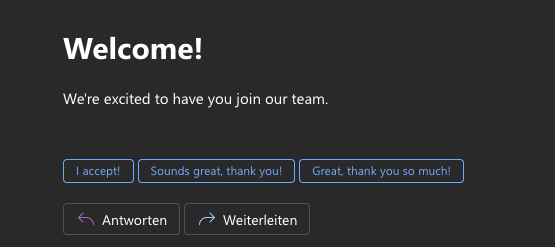
As the user now has a mailbox let’s send them an email, with a nice welcome message from HR:
resource "msgraph_resource_action" "send_welcome_email" {
  resource_url = "users/hr@mycompany.com"
  action       = "sendMail"
  method       = "POST"

  body = {
    message = {
      subject = "Welcome to the organization!"
      body = {
        contentType = "HTML"
        content     = "<h1>Welcome!</h1><p>We're excited to have you join our team.</p>"
      }
      toRecipients = [
        {
          emailAddress = {
            address = resource.msgraph_resource.user.output.all.userPrincipalName
            name    = resource.msgraph_resource.user.output.all.displayName
          }
        }
      ]
    }
    saveToSentItems = true
  }
}
a “terraform init” and “terraform apply” later - the newly created user has received the email 😉
Conclusion
The msgraph Terraform provider is finally available, and it solves a real problem. If your team already uses Terraform for infrastructure, you can now manage M365 and Entra ID the same way. No more clicking through portals—just define your users, groups, and policies in code, commit them to Git, and let your pipeline handle the rest.
When it comes to usecases, my opinion is that this provider will really shine when it comes to:
- Managing Global Tenant settings (App Management Policies)
- CRUD operations on Conditional Access Policies (also think about drift detection !!)
- Handling Intune Policies
- Access Packages, etc.
As the provider is, at the time of writing, available in version 0.2.0 there will be still some bugs, so keep that in mind.
What`s next ?
This is just the beginning. I have already lots of ideas on how to move forward here. In Part 2 of this series, we’ll look into more practical, real-world implementations—showing you how to manage Entra ID global tenant settings, Conditional Access policies, and Intune configurations with actual code examples.
So if you don’t want to miss them - stay tuned!
Links and References
- Microsoft Annoucement - Announcement of the new MSGraph Terraform Provider and Terraform VSCode Extension
- Terraform Registry - Terraform Registry and provider documentation
- Microsoft IaC - Microsoft Documentation of IaC templates for Microsoft Graph
- Microsoft Graph API Reference - Microsoft GraphAPI Reference
- Github - Official MS Github Repo for MSGraph Terraform provider
- Managed Identities - How managed identities for Azure resources work with Azure virtual machines
- Workload identity federation aka OpenID Connect - Introduction to Azure DevOps Workload identity federation (OIDC) with Terraform